Automating ER and Night Shift Scheduling in Healthcare
2026-08-21

Healthcare organizations operating emergency rooms and intensive care units rely on 24/7 shift-based staffing. Emergency room and night shift schedules, in particular, are directly connected to patient safety, making systematic working time management just as important as workforce allocation. Healthcare organizations today face a combination of challenges, including fluctuations in staffing availability, accumulated fatigue among shift workers, and increased attention to statutory working-hour requirements.
In this environment, manually managing healthcare shift schedules or relying primarily on Excel has clear limitations. An integrated attendance management framework with automated shift scheduling can help organizations apply consistent standards by shift type and manage working time calculations more systematically. In this article, we look at how healthcare shift schedules are structured, how to automate schedule-based working time calculations, and how Shiftee can support these operations.
Shift Types and Working Time Standards for Emergency Rooms and ICUs
Emergency room shift schedules commonly follow three-shift or two-shift patterns, depending on the healthcare organization's operating policies. A three-shift structure consisting of Day, Evening, and Night shifts typically rotates on a defined cycle, while intensive care units may also use consecutive shifts depending on patient acuity. Healthcare shift schedules therefore need to account not only for working hours but also for break times, consecutive workdays, and night work.
Healthcare organizations operating night shifts should clearly define scheduled and maximum working hours for each shift. If standards for consecutive shifts, shift rotation cycles, and break deductions are not clearly established, differences can easily arise between actual and scheduled working hours.
Scheduling Challenges in Night and Consecutive Shift Environments
Night shift schedules require continuous staffing coverage. If an employee unexpectedly takes leave or sick leave, the overall schedule may need to be adjusted, which can also result in additional overtime for other employees. With manual scheduling, maintaining clear change histories for these adjustments can be difficult.
Emergency room schedules also often differ between monthly plans and actual operations. Even when a three-shift schedule is planned, an increase in emergency patients may extend actual working hours. When approval processes, working time calculations, and night work aggregation are managed separately, this can increase the administrative workload for HR teams.
To manage healthcare shift schedules systematically, organizations should establish the following operational standards.
- Standardize schedule patterns by shift type.
- Maintain change histories through defined approval settings when work schedules are changed.
- Compare approved and actual working hours to establish clear working time calculation standards.
Healthcare Shift Scheduling and Automated Working Time Calculations
Automating healthcare shift scheduling involves more than simply assigning shifts. Schedule planning, clock-in and clock-out records, and working time calculations need to be connected within a single process.
-
Set shift types as schedule patterns. Configure patterns such as three-shift, two-shift, and consecutive night shifts and apply them by department. Work schedules can then be created on a monthly or weekly basis, with approval processes for schedule creation and changes applied as needed.
-
The next step is managing clock-in and clock-out records. Employees can record attendance using location or WiFi authentication, and actual records can be compared with planned work schedules to identify differences such as late arrivals or overtime. Break deductions can be configured based on total working hours or specific times, allowing the same framework to be applied to night shift schedules.
-
Finally, during working time calculations, approved working hours can be compared with actual working hours, while average working hours can be calculated by day, week, and month. Overtime, night work, and holiday work can be managed separately, and report fields can be configured to review healthcare shift schedule data. Connecting these processes creates a framework for automated working time calculations based on schedules.
Managing Healthcare Shift Work with Shiftee
Shiftee supports work schedule configuration, clock-in and clock-out records, and working time calculations within a single system for healthcare shift operations. For hospitals and other healthcare organizations that manage nurse schedules, it is important to establish an attendance management framework that considers both shift operations and working time management. Complex schedules, including emergency room and night shifts, can also be managed systematically based on predefined operating standards.
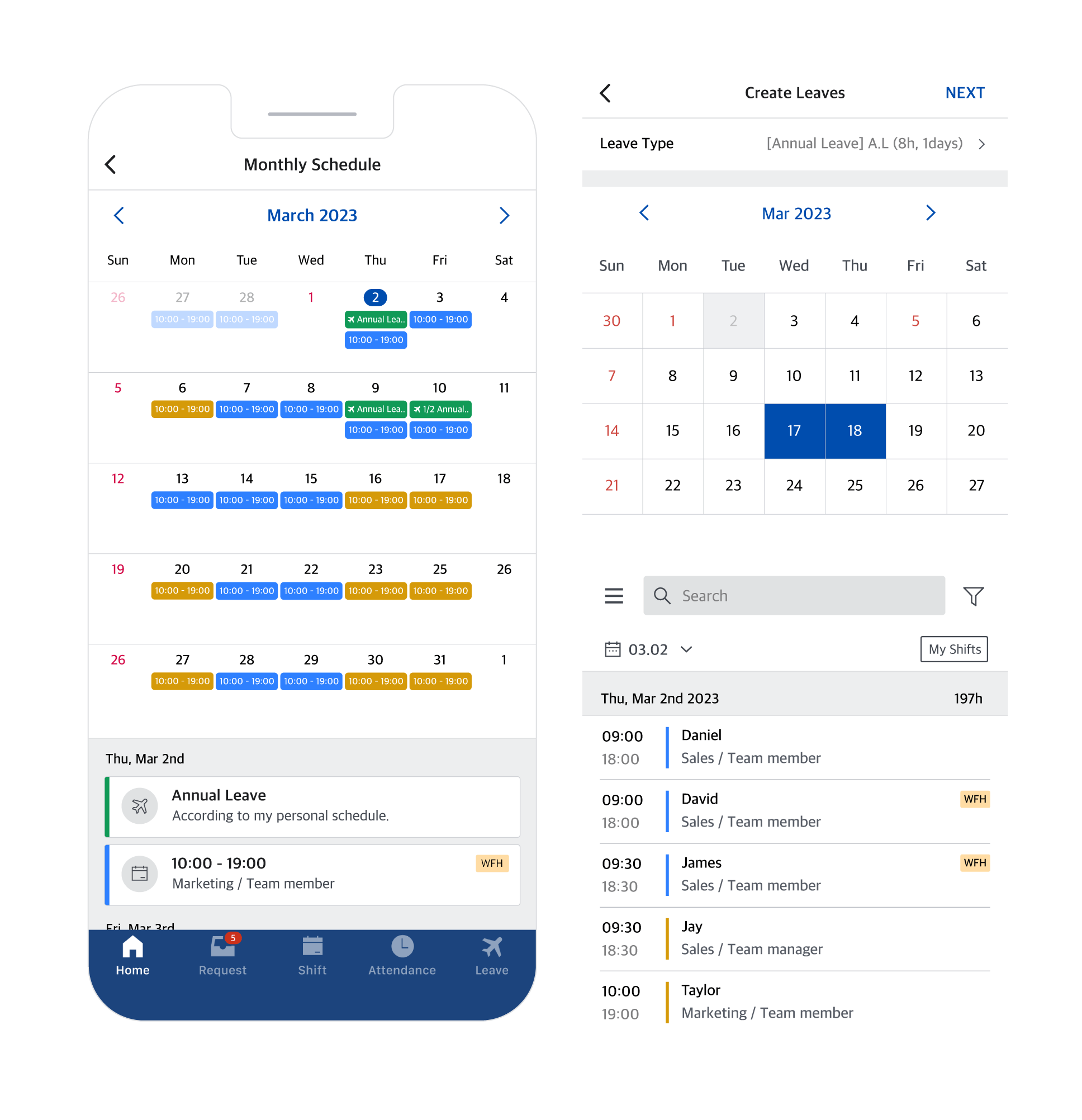
1. Schedule Pattern-Based Work Schedule Management
Different shift types, including three-shift and two-shift patterns, can be configured as schedule patterns and used to create monthly or weekly work schedules, helping healthcare organizations manage shift schedules systematically.
2. Location- and WiFi-Authenticated Clock-In and Clock-Out Records
Employees can clock in and out using workplace location or WiFi authentication, and actual records can be compared with planned work schedules to identify attendance differences such as late arrivals and overtime.
3. Overtime, Night Work, and Holiday Work Rules
Request restrictions can be configured for specific conditions such as overtime, night work, and holiday work, allowing healthcare organizations to manage working time standards according to predefined settings when operating shift schedules.
4. Working Time Calculations and Average Working Hours
Approved working hours can be compared with actual working hours, while average working hours can be calculated by day, week, and month. This helps organizations systematically manage the working time data needed for shift operations.
5. Organization- and Workplace-Level Permissions for Multiple Locations
Multiple workplaces can be configured by organization or branch, while data access can be differentiated based on employee access permissions. This allows healthcare organizations to manage shift schedules separately for emergency rooms, intensive care units, and wards while maintaining consolidated workforce data.
Emergency room and night shift schedules are more than scheduling tools. They form part of the workforce operating framework that supports the continuity of healthcare operations. Managing healthcare shift schedules through an integrated, data-based framework can help organizations maintain working time standards while improving workforce allocation.
Automated working time calculations based on schedules connect planning, attendance records, and working time calculations within a single process. This can reduce repetitive manual work for HR teams and provide decision-makers with objective working time data for workforce planning.
Shiftee provides schedule pattern settings, clock-in and clock-out record management, and overtime and night work rules for emergency room and night shift operations, helping healthcare organizations establish a systematic approach to shift scheduling automation. For healthcare organizations that require 24/7 operations, automated shift scheduling can be considered as a practical way to further strengthen workforce operations.
When citing the content, be sure to indicate the source according to copyright law.