Why UI Matters Most When Choosing a WFM Solution
2025-11-10

As digital transformation accelerates across industries, technology continues to grow more sophisticated — but its value diminishes quickly if the people using it find it frustrating. In organizations where employees span a wide range of ages and job functions, a UI (User Interface) that everyone can access and use with ease is not optional — it is essential. From digitally native Millennials and Gen Z employees to older workers less accustomed to digital tools, a system only earns the title of “user-centric” when it genuinely works for everyone.
This is especially true for field-based workers in industries such as construction and manufacturing, where the proportion of older employees with limited digital familiarity tends to be higher. Complex interfaces or systems requiring separate installation create barriers from day one, complicating adoption before it even begins. For any newly implemented system to take root effectively across an organization, an interface that anyone can use without difficulty is a fundamental prerequisite.
1. Why User-Friendly App UI Matters
A user-friendly UI is one of the most important criteria when selecting an attendance management app. The reasons are clear.
- Reduced training burden: The system can be used on-site immediately without advance training, enabling faster adoption.
- Accessible to employees of all ages: Older employees and those with limited digital experience can use the system without difficulty.
- Lower work-related stress: Eliminating frustration caused by complex navigation or system errors improves user satisfaction.
- Higher HR productivity: Streamlining repetitive requests and attendance processing reduces the administrative burden on HR teams.
Cluttered screens and frequent errors generate user resistance — and that resistance directly undermines the system's effectiveness. Everyday functions such as clocking in and out, checking work schedules, and submitting leave requests should be intuitive enough that all employees become comfortable with them quickly.
2. Simplified Attendance Management Through Shiftee's App UI
Shiftee provides an employee-centric mobile app designed to help attendance management integrate naturally into the organization — from clocking in to submitting leave requests, every interaction is straightforward.
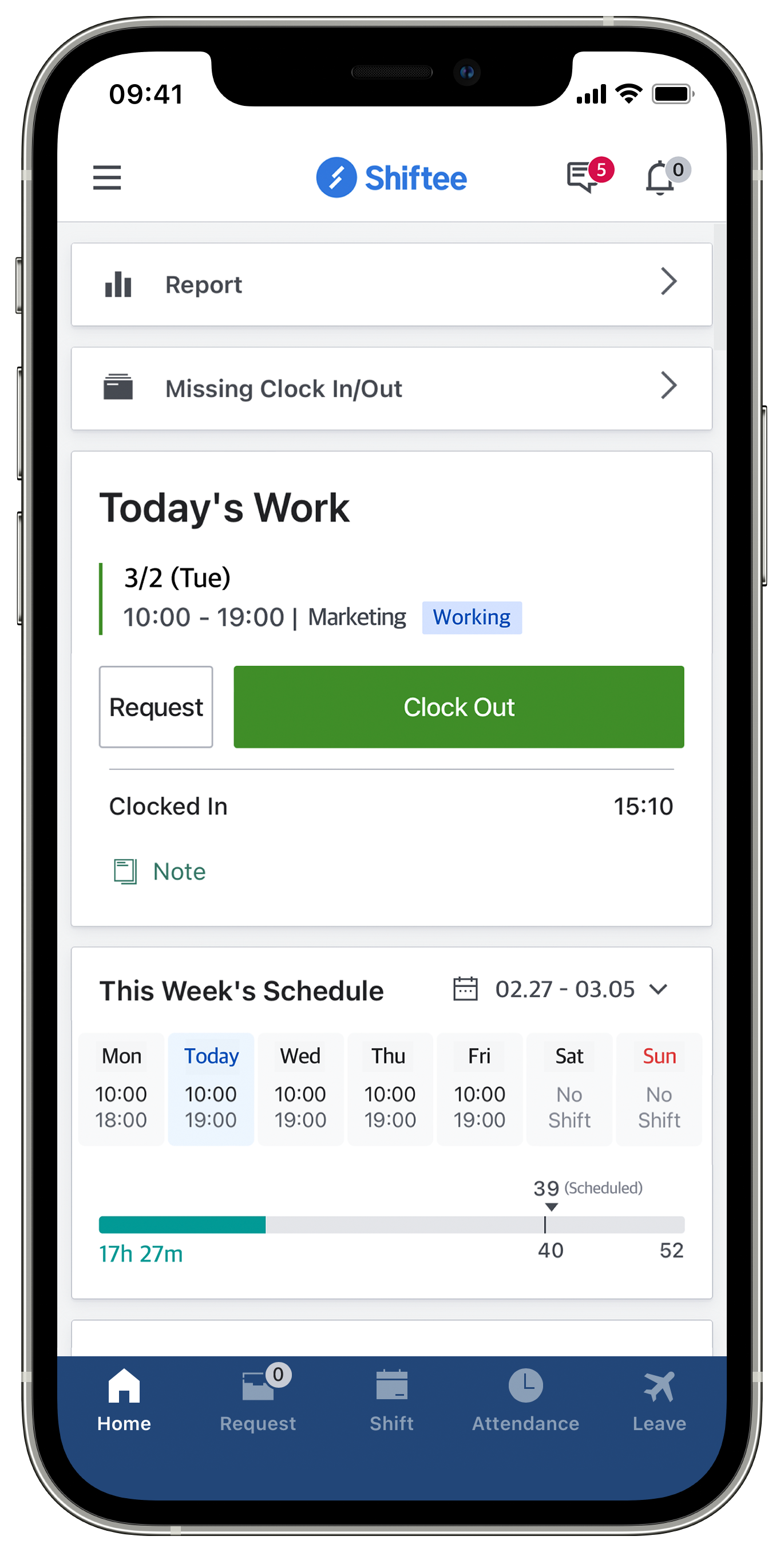
- Effortless clock-in/clock-out: A clock-in and clock-out button visible the moment the app opens, combined with Wi-Fi-based or location-based clock-in/clock-out, enables accurate attendance recording with a single tap. No complex equipment or installation required — accessible to everyone.
- Clear schedule visibility and management: A unified view of each employee's work schedule and leave calendar allows staff to review their own schedules and communicate with managers in real time. Even complex arrangements such as shift rotations and flexible work schemes are displayed intuitively.
- Quick approval workflows: Leave requests, schedule change requests, and document issuance requests can all be completed within the app in just a few taps. Real-time approval status updates accelerate communication across the organization.
- Easy access to reports and messages: Key data — including working hour summaries, remaining annual leave, and approval histories — are available in real time, and organizational announcements and approval notifications are delivered directly within the app, improving information accessibility and day-to-day efficiency.
💡 Learn more about this Shiftee feature: Shiftee Mobile App
3. Shiftee in Practice: How an Intuitive App UI Transforms HR Operations
Across industries including construction, manufacturing, distribution, education, healthcare, and office-based environments, Shiftee consistently receives high marks for its intuitive UI. The impact is particularly pronounced in mobile-first environments where real-time access is essential.
An HR manager at Company A, a global manufacturing firm, shared the following about the Shiftee app:
“The app design received positive feedback from both employees and managers. Even older employees adapted to the system without difficulty, and the transparency of work schedules and working hour data was a genuine convenience for everyone in the organization.”
An operations and administration manager at Company B, an IT and telecommunications firm, offered this perspective:
“Everything is designed to work smoothly on mobile, so tasks can be completed entirely from a phone. The synchronization with the desktop is excellent — even without turning on a computer at the office, clock-in/clock-out management and rapid task processing are all possible. That makes a real difference.”
Building sophisticated functionality capable of handling diverse work environments is important — but so is how easily employees can actually use it. Even the most powerful system will struggle to gain traction if the people using it find it difficult.
The Shiftee app is designed with a focus on making complex capabilities simple to navigate — centered on a UI that anyone can use intuitively. Regardless of age, job function, or level of digital familiarity, employees can adapt quickly and the system can embed naturally across the organization.
Experience what attendance management built for every employee looks like — with Shiftee.
When citing the content, be sure to indicate the source according to copyright law.